Filing income tax can sometimes feel like trying to untangle a long, messy string—no matter how hard you try, the knots just keep coming back. But what if you had a smart tool that helps you sort your numbers smoothly, quickly, and confidently? In this article, we’ll explore how downloading a reliable All-in-One Excel-based income Tax Preparation Software for FY 2025-26 can make your tax journey easier than ever. And if you’re a non-government employee, this could be exactly what you need to stay stress-free during the tax season.
Table of Contents
| Sr# | Headings |
| 1 | Introduction to Excel-Based Tax Software |
| 2 | What Makes Excel-Based Tax Software Useful? |
| 3 | Benefits for Non-Government Employees |
| 4 | Features of All-in-One Income Tax Preparation Software |
| 5 | Step-by-Step Guide to Using the Software |
| 6 | How Excel Simplifies Tax Calculations |
| 7 | Importance of Automation in Tax Filing |
| 8 | Tips to Avoid Common Tax Filing Errors |
| 9 | Using Form 16 with Excel Software |
| 10 | Handling Tax Deductions Easily |
| 11 | Why Accuracy Matters in Tax Filing |
| 12 | Comparison: Manual vs Excel-Based Filing |
| 13 | Security of Excel-Based Tax Tools |
| 14 | Who Should Use This Software? |
| 15 | Final Thoughts |
1. Introduction to Excel-Based Tax Software
When you hear the term Income Tax Preparation Software in Excel, you might imagine something complex. But surprisingly, it’s designed to simplify everything. This tool helps you calculate your income, deductions, exemptions, and tax liability quickly, unlike traditional manual methods.
2. What Makes Excel-Based Tax Software Useful?
Excel-based tools gain popularity because they offer easy use, quick access, and smooth operation without requiring any special installation. Moreover, these tools enhance accuracy because they use built-in formulas that instantly calculate values. Additionally, they reduce errors by updating figures automatically as you enter data. Consequently, many individuals prefer Excel-based calculators for filing taxes. Furthermore, users trust them because the system clearly displays every step. In addition, the interface simplifies complex tax calculations, which otherwise feel overwhelming. Therefore, especially when accuracy becomes crucial, people choose Excel-based software to stay confident and error-free. Besides, the tool not only speeds up calculations but also streamlines the entire tax-filing experience. Ultimately, Excel-based tax software empowers users to handle their taxes with ease.
3. Benefits for Non-Government Employees
If you’re a non-government employee, you manage several salary components like HRA, incentives, special allowances, and varied deductions that differ from government pay structures. Because of this, filing taxes manually often becomes tricky. However, the All-in-One Excel Software supports you by organizing each salary component neatly. Moreover, it adapts to unique income structures effortlessly. Consequently, the tool ensures proper calculations even when the salary format becomes complicated. Additionally, you save valuable time because the automated formulas instantly adjust each figure. Therefore, this tool proves highly beneficial for non-govt employees seeking clarity and accuracy in tax filing.
4. Features of All-in-One Income Tax Preparation Software
This software includes several powerful features that make tax preparation smooth and error-free. Furthermore, each feature guides you step-by-step.
a. Auto Calculation of Tax
The software automatically calculates tax according to the latest FY 2025-26 rules. Additionally, it instantly updates the results when you modify any value.
b. Deduction Entries
The system allows you to easily enter deductions under sections 80C, 80CCD(1B), 80D, and others. Moreover, it highlights relevant sections clearly so you never get confused.
c. Form 10E Support
If you receive arrears, the software helps you compute relief under Section 89(1). Consequently, you avoid manual errors that often occur during arrear calculations.
d. Easy-to-Follow Layout
The clean Excel interface guides you step-by-step. Additionally, it ensures smooth navigation even for beginners. Meanwhile, the sheet keeps your data structured and organised.
5. Step-by-Step Guide to Using the Software
Using the software feels like walking along a clearly marked path. First, you download the Excel file. Next, you enable macros. Then, you enter your personal details. Afterwards, you fill in salary components. Subsequently, you insert all deduction amounts. Finally, you review the auto-generated tax summary. Altogether, these steps make the process extremely simple. In fact, the smooth workflow encourages even first-time users to file taxes confidently.
6. How Excel Simplifies Tax Calculations
Excel acts like a digital calculator with superpowers. Because formulas work automatically, you never have to worry about miscalculations. Furthermore, Excel sheets store your previous year’s data, allowing easy comparisons. Additionally, the software organises everything clearly so you understand each number. Consequently, you experience a seamless and reliable tax-calculation process.
7. Importance of Automation in Tax Filing
Automation reduces human error significantly. For example, when you update your income, the entire structure updates instantly. Similarly, when you change deduction values, the tax liability adjusts automatically. Therefore, automation improves accuracy, boosts confidence, and ensures correct filing every time. Moreover, automation eliminates repetitive manual work, saving valuable time.
8. Tips to Avoid Common Tax Filing Errors
To avoid unnecessary mistakes, you should follow a few essential steps. First, always double-check your Form 16. Next, verify every deduction entry. Additionally, ensure your PAN and personal details are accurate. Consequently, you prevent issues such as mismatches, notices, or delays. Finally, by staying attentive in these small ways, you protect yourself from major complications later.
9. Using Form 16 with Excel Software
Form 16 acts as the backbone of your tax calculation. With this Excel software, you simply copy the values from Form 16 into the appropriate cells. Immediately, the system processes the data and generates accurate results. Furthermore, the automated structure ensures consistency. Therefore, you avoid manual misreading of figures and save time.
10. Handling Tax Deductions Easily
You never need to memorise which section covers which deduction. The Excel sheet provides clear instructions and guides you through deductions under Sections 80C, 80D, 80CCD(1B), 24(b), and more. Moreover, it organizes each entry neatly. Consequently, you complete the deduction process efficiently and without confusion.
11. Why Accuracy Matters in Tax Filing
Accurate filing helps you avoid notices, penalties, and revisions. Furthermore, accuracy prevents financial discrepancies that may cause stress later. Additionally, correct reporting offers peace of mind throughout the year. Ultimately, precision in tax filing protects you from trouble and supports smooth compliance.
12. Comparison: Manual vs Excel-Based Filing
Manual filing feels like guessing in the dark. In contrast, Excel-based filing feels like switching on a bright flashlight. Furthermore, automation reduces your chances of making mistakes. Moreover, Excel organises every step clearly, guiding you through a much more efficient process. Therefore, Excel-based filing outperforms manual methods in almost every way.
13. Security of Excel-Based Tax Tools
Because this tool works offline, your data remains securely stored on your personal computer. Consequently, you never need to upload sensitive information online. Additionally, this offline structure enhances privacy and reduces risks associated with cyber threats.
14. Who Should Use This Software?
This software serves a wide range of users. It especially benefits:
- Private sector employees
- Contractual workers
- Teachers in private institutions
- NGO professionals
- Anyone with a non-government salary structure
Furthermore, anyone who prefers accuracy, simplicity, and automation in tax filing will find this tool extremely useful.
15. Final Thoughts
Using an All-in-One Excel-based income Tax Preparation Software offers a smart, efficient, and stress-free experience. Moreover, the tool helps you stay organised, accurate, and confident throughout the tax season. Therefore, instead of stressing over calculations, you can simplify everything and focus on completing your tax filing smoothly.
Download Automatic Income Tax Preparation Software All-in-One in Excel (F.Y. 2025–26) for Non-Government Employees
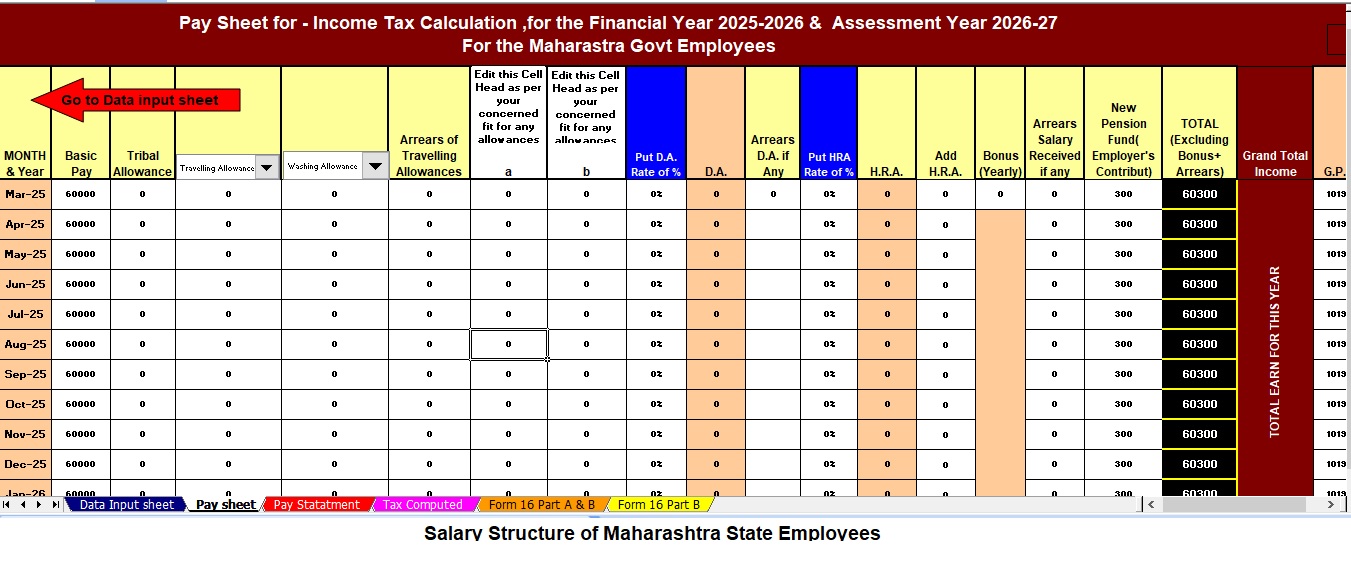
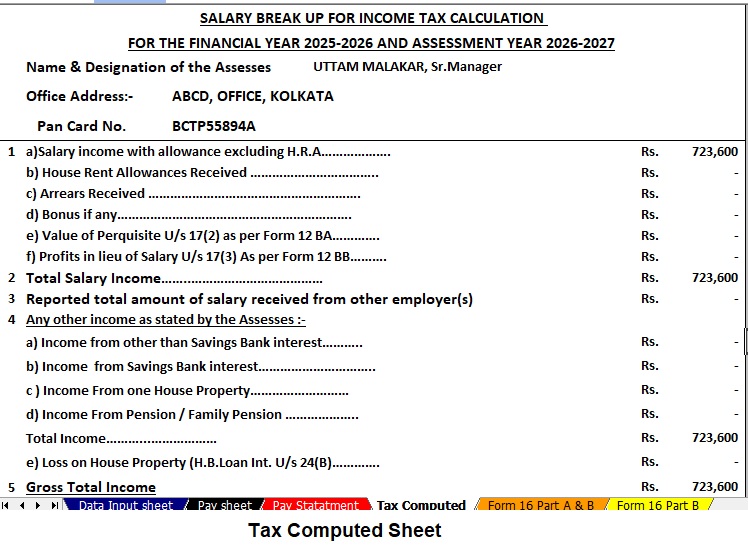


Key Features of the Excel-Based Tax Preparation Utility
- Dual Regime Option:
You can effortlessly choose between the New or Old Tax Regime under Section 115BAC. Furthermore, the tool automatically compares both regimes to help you identify the most tax-saving option. - Customised Salary Structure:
It automatically adjusts according to your salary format, whether you belong to a Non-Government organisation. Additionally, this customisation reduces manual entry and saves valuable time. - Automatic Income Tax Form 12 BA.
- Updated Form 16 (Part A & B):
This tool automatically generates Revised Form 16 (Part A & B) for the Financial Year 2025–26. Likewise, it ensures that your Form 16 remains compliant with the latest tax formats. - Simplified Compliance:
It ensures quick and error-free tax computation through advanced built-in formulas. Furthermore, you can confidently prepare your return with zero manual intervention, enhancing both speed and accuracy.