Filing income tax, although common, still feels complicated for many employees. However, when you understand the basics and use smart tools like Tax Software in Excel, the entire process becomes smooth. Moreover, the right tool guides you step by step, so you stay accurate. Meanwhile, the Income Tax rules for FY 2025–26 bring updates; therefore, you must stay informed. Imagine tax filing like driving: once you know the route, then the journey feels easy. Hence, this guide will simplify everything.
Table of Contents
| Sr# | Headings |
| 1 | Introduction to Income Tax 2025–26 |
| 2 | New Changes in Income Tax Rules |
| 3 | Old vs New Tax Regime |
| 4 | Why Employees Must Understand Tax |
| 5 | Benefits of Tax Software in Excel |
| 6 | How Excel Tax Software Works |
| 7 | Salary Components Explained |
| 8 | Deductions & Exemptions |
| 9 | Important Forms You Need |
| 10 | Step-by-Step Filing Guide |
| 11 | Mistakes to Avoid |
| 12 | Tips to Save More Tax |
| 13 | How Excel Makes Filing Easy |
| 14 | Final Checklist |
| 15 | Conclusion |
1. Introduction to Income Tax 2025–26
Income tax affects every salaried employee, and every year brings new rules. Thus, knowing the updates helps you plan. Additionally, the government promotes digital tools; therefore, using Tax Software in Excel saves time.
2. New Changes in Income Tax Rules
The budget introduces changes, for example, updated rates and revised deductions. Although rates seem small, yet the impact can be big. Further, knowing these changes early helps you plan better.
3. Old vs New Tax Regime
Employees choose between regimes. On one hand, the old regime offers deductions. On the other hand, the new regime gives lower rates. Therefore, compare both. Consequently, choose what reduces your tax.
4. Why Employees Must Understand Tax
Understanding tax helps control finances. Besides, you earn more awareness. Finally, you avoid penalties. Thus, tax knowledge is financial strength.
5. Benefits of Tax Software in Excel
Excel-based tools are handy. First, they are easy. Second, they reduce mistakes. Third, they compare regimes. Moreover, Tax Software in Excel saves hours.
6. How Excel Tax Software Works
You open the file, then enter your data. Meanwhile, formulas are calculated. Afterwards, you get results instantly. Therefore, you skip manual math. Also, the software suggests tax-saving ideas.
7. Salary Components Explained
Salary includes basic pay, HRA, DA, etc. Although it looks simple, however, tax applies differently. Thus, knowing each part helps. Additionally, benefits like LTA reduce tax.
8. Deductions & Exemptions
Deductions reduce taxable income. For instance, 80C allows investments. Similarly, 80D covers insurance. Therefore, use them. However, learn the limits to avoid errors. Likewise, exemptions like HRA reduce tax.
9. Important Forms You Need
You need Form 16, Form 10E (if needed), and proof of investments. Therefore, keep documents ready. Next, verify figures. Then, cross-check bank details.
10. Step-by-Step Filing Guide
First, collect documents.
Then, check TDS in Form 26AS.
After that, use Tax Software in Excel.
Finally, upload the return online.
Therefore, keep your login safe.
11. Mistakes to Avoid
Avoid wrong regime selection. Also, don’t miss deductions. In addition, verify income from all sources. Thus, accuracy matters.
12. Tips to Save More Tax
Invest wisely. Moreover, use Section 80C fully. Similarly, choose insurance under 80D. Therefore, planning early helps. Additionally, choose tax-friendly allowances.
13. How Excel Makes Filing Easy
Excel simplifies numbers. Instead, you focus on entries. Meanwhile, it avoids calculation errors. Also, it compares regimes. Therefore, Tax Software in Excel boosts confidence.
14. Final Checklist
Check name, PAN, bank details, and income. Then, verify deductions. Finally, submit the return before the deadline. Therefore, be responsible.
15. Conclusion
Tax filing does not need to be stressful. Thus, when you understand rules and use Tax Software in Excel, the process becomes easy. Moreover, planning gives peace of mind. So, start early and save more tax.
FAQs
- What is the benefit of using Tax Software in Excel?
It calculates tax automatically, compares regimes, and reduces mistakes. - Do I need Form 16 to use Excel Tax Software?
Yes, because it includes income details needed for tax filing. - Which tax regime is better for 2025–26?
It depends on your deductions. Excel tools help you compare quickly. - Can I claim HRA under the new regime?
No, exemptions like HRA are not allowed in the new regime. - How early should I plan tax savings?
Start at the beginning of the financial year for maximum benefits.
Download Automatic Income Tax Preparation Software All-in-One in Excel (F.Y. 2025–26) for Government and Non-Government Employees
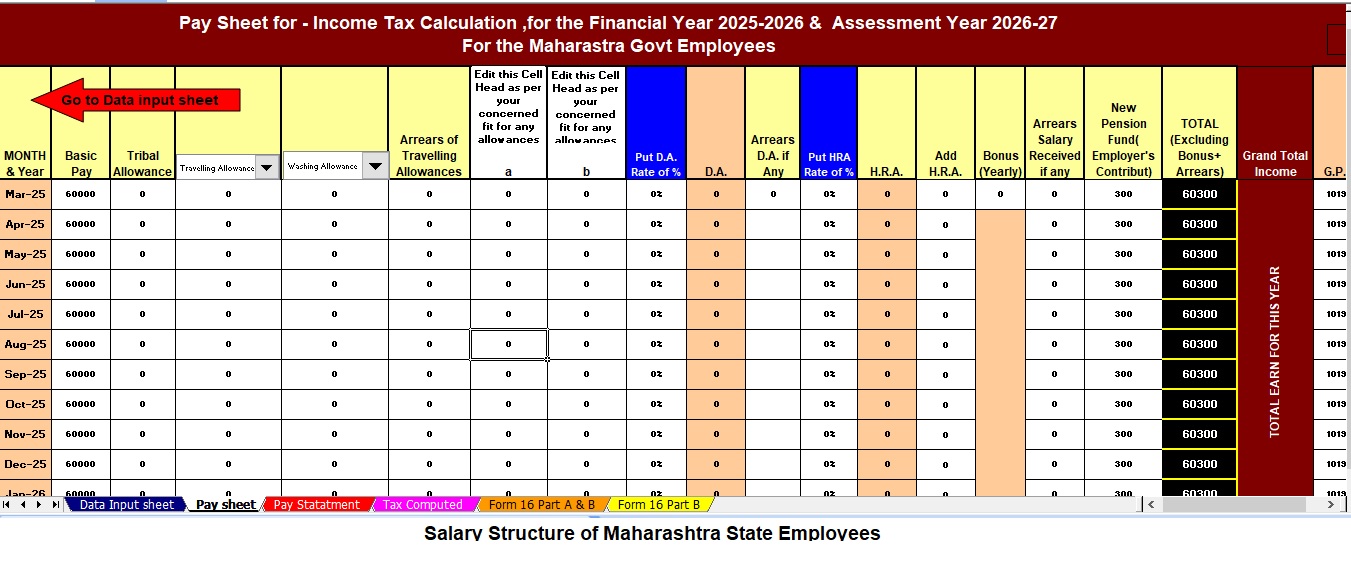
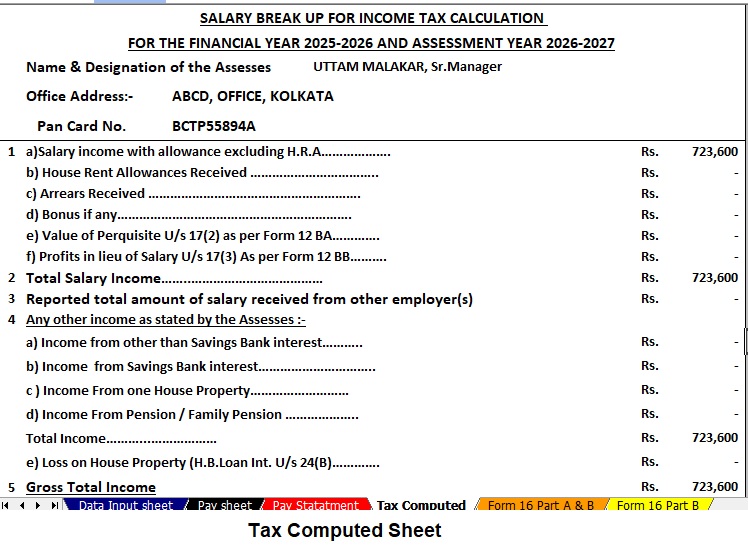


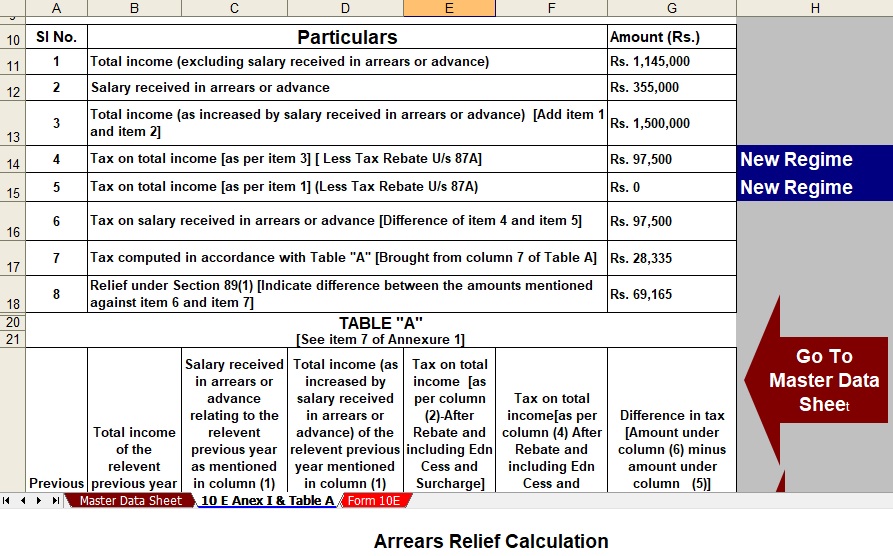
Key Features of the Excel-Based Tax Preparation Utility
- Dual Regime Option:
You can effortlessly choose between the New or Old Tax Regime under Section 115BAC. Furthermore, the tool automatically compares both regimes to help you identify the most tax-saving option. - Customised Salary Structure:
It automatically adjusts according to your salary format, whether you belong to a Government or Non-Government organisation. Additionally, this customisation reduces manual entry and saves valuable time. - Automatic Arrears Relief Calculator [Section 89(1) + Form 10E]:
It accurately calculates arrears relief for the financial years ranging from 2000–01 to 2025–26. In addition, it instantly generates Form 10E for submission, ensuring precise tax relief computations. - Updated Form 16 (Part A & B and Part B):
This tool automatically generates Revised Form 16 (Part A & B and Part B) for the Financial Year 2025–26. Likewise, it ensures that your Form 16 remains compliant with the latest tax formats. - Simplified Compliance:
It ensures quick and error-free tax computation through advanced built-in formulas. Furthermore, you can confidently prepare your return with zero manual intervention, enhancing both speed and accuracy.