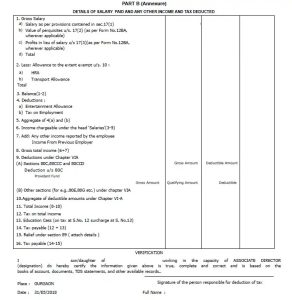

Have you ever wished that preparing Form 16 for a large team could be easier? Usually, issuing Form 16 can feel like packing 50 bags for a trip—one by one. However, what if you could prepare and download all 50 employees’ Form 16 Part B at the same time? Surprisingly, it is possible. In fact, it saves time, reduces errors, and helps HR teams work smarter. In this article, we explore a simple way to download and prepare Form 16 for multiple employees at once. Moreover, we use an easy conversational guide so anyone can follow.
Table of Contents
| Sr# | Headings |
| 1 | Introduction to Form 16 |
| 2 | What is Form 16 Part B |
| 3 | Why Prepare 50 Form 16 Together |
| 4 | Benefits of Bulk Preparation |
| 5 | Tools Required |
| 6 | Step-by-Step Download Process |
| 7 | Format and Structure |
| 8 | Accuracy Tips |
| 9 | Common Mistakes |
| 10 | Security and Data Safety |
| 11 | Time-Saving Techniques |
| 12 | Practical Example |
| 13 | Best HR Practices |
| 14 | Final Thoughts |
| 15 | FAQs |
1. Introduction to Form 16
Form 16 is a yearly salary tax certificate issued by employers. It shows an employee’s income and tax details. So, every employee needs it for filing income tax returns. Usually, HR teams create this individually. But now, you can generate many together.
2. What is Form 16 Part B
Part B includes salary details. It contains allowances, deductions, and taxable income. Employers generate it after TDS return filing. So, it reflects accurate tax figures.
3. Why Prepare 50 Form 16 Together
When employees grow, preparing one by one is slow. Therefore, preparing 50 together is smart. Besides, it ensures a uniform format. And it avoids manual errors.
4. Benefits of Bulk Preparation
Bulk preparation helps HR:
- save time
- reduce mistakes
- protect data
- maintain consistency
For instance, HR teams can prepare forms in minutes.
5. Tools Required
To download all 50 employees’ Form 16, you need:
- Excel-based software
- Employee salary data
- PAN details
- TAN details
- TDS return filed
6. Step-by-Step Download Process
- Open the Form 16 preparation tool.
- Import employee data.
- Verify PAN and salary details.
- Click “Generate 50 Form 16 Part B”.
- Export all PDFs at once.
Then, share with employees.
7. Format and Structure
Each Form 16 has:
- Personal details
- Income details
- Salary components
- Tax calculation
- Deduction list
So, ensure data matches Form 26AS.
8. Accuracy Tips
To avoid errors:
- Always validate PAN
- Match values with TDS
- Check exemptions
- Use updated FY rules
Additionally, recheck totals.
9. Common Mistakes
Some mistakes include:
- Wrong employee details
- Old tax slabs
- Missing deduction values
- Wrong TAN
Thus, double-check before downloading.
10. Security and Data Safety
Data security matters. Keep files password-protected. Also, store them in cloud vaults. And limit access only to HR. Therefore, employee data stays safe.
11. Time-Saving Techniques
Use features like:
- Auto calculation
- Bulk import
- Single-click export
Gradually, you’ll reduce your workload.
12. Practical Example
Imagine you handle a school with 50 staff. Preparing Form 16 one by one takes days. Instead, bulk generation completes it in minutes. It’s like watering 50 plants with one pipe rather than 50 cups.
13. Best HR Practices
Professional HR teams:
- Prepare data early
- Use bulk tools
- Follow tax deadlines
- Keep employee records updated
So, filing season becomes smoother.
14. Final Thoughts
In short, downloading 50 employees’ Form 16 Part B at one time is simple. Although many still do it manually, smart tools make life easy. In conclusion, bulk preparation is fast, accurate, and stress-free.
FAQs
1. How can I download 50 Form 16 Part B at once?
You can use an Excel-based Form 16 tool that supports bulk generation.
2. Is Form 16 necessary for filing income tax?
Yes, employees use Form 16 to file their ITR.
3. Does bulk preparation affect accuracy?
No, it increases accuracy because calculations are automated.
4. Can HR use free tools for Form 16?
Yes, several tools offer basic free features.
5. When is Form 16 issued for FY 2025-26?
It is usually issued by June after TDS returns are filed.
Download the Automatic Income Tax Master of Form 16 Part B in Excel, which can prepare at a time 50 Employees Form 16 Part B for the FY 2025-26


Main features of the Excel Utility are:-
- First, the Excel Utility prepares 50 employees’ Form 16 Part B at a time for FY 2025-26.
- Moreover, the Excel Utility calculates your Income Tax liabilities as per the Income Tax Slab under the New and Old Tax Regime.
- Further, the Excel Utility provides a unique salary structure for individuals as per the Budget 2025.
- Additionally, the Excel Utility includes all amended Income Tax Sections modified in Budget 2025-26 under both the New and Old Tax Regime.
- Therefore, the Excel Utility prevents double or duplicate PAN numbers for each employee, so you avoid any fear of repeated name or PAN entries.
- Meanwhile, you print Form 16 Part B on A4 paper size.
- Then, the Excel Utility automatically converts the amount into words without using any Excel formula.
- Also, both Government and Non-Government organisations use this Excel Utility.
- However, the Excel Utility is simply an Excel file; download it and start entering data in the input sheet, and it prepares 50 employees’ Form 16 Part B at a time.
- Finally, you prepare and save employees’ data on your system, and it works with Office 2003, 2007, 2010, and also 2011 MS Office.