Tax season often feels overwhelming. Every year, salaried individuals worry about calculations, deductions, exemptions, and compliance. However, things have changed. Income Tax Preparation Software in Excel All-in-One now makes tax calculation simple, fast, and reliable. Instead of struggling with complex formulas, you can rely on one smart Excel file. In fact, this tool works like a digital tax assistant—quietly doing the hard work while you stay relaxed. Therefore, let’s explore how this Excel-based solution transforms tax preparation for the general public.
Table of Contents
| Sr# | Headings |
| 1 | What Is Income Tax Preparation Software in Excel All-in-One |
| 2 | Why Salaried Persons Need Automatic Tax Software |
| 3 | How All-in-One Excel Tax Software Works |
| 4 | Key Features That Make It Powerful |
| 5 | Old vs New Tax Regime Comparison |
| 6 | Built-in Salary Structure and Allowances |
| 7 | Automatic Deductions and Exemptions |
| 8 | Form 10E and Arrears Relief Integration |
| 9 | Automatic Generation of Form 16 |
| 10 | Accuracy, Compliance, and Error Reduction |
| 11 | Time-Saving Benefits for Employees |
| 12 | Benefits for Employers and Accountants |
| 13 | User-Friendly Design and Easy Customisation |
| 14 | How to Download and Use Safely |
| 15 | Who Should Use This Excel Utility |
1. What Is Income Tax Preparation Software in Excel All-in-One
Income Tax Preparation Software in Excel All-in-One is a smart Excel utility that calculates income tax automatically. It combines salary computation, deductions, exemptions, and tax liability in a single file. Moreover, it removes confusion and reduces manual effort. In other words, it works like a Swiss Army knife for tax planning—compact, efficient, and versatile. Therefore, users get everything they need in one place.
2. Why Salaried Persons Need Automatic Tax Software
Salaried people already balance work, family, and finances. Consequently, manual tax calculation becomes stressful. Additionally, even a small mistake can lead to wrong tax liability. Hence, automatic tax software ensures accuracy and peace of mind. As a result, you focus on life, not calculations. Simply put, why struggle when automation makes life easier?
3. How All-in-One Excel Tax Software Works
First, you enter basic salary details. Then, the software processes taxable income automatically. Furthermore, it applies correct slab rates instantly. After that, it displays the final tax liability clearly. Thus, the entire process feels effortless. Although it looks magical, it relies on well-designed formulas and logic. Therefore, results remain reliable and transparent.
4. Key Features That Make It Powerful
Automatic Calculation:
The software calculates tax instantly without manual formulas.
Real-Time Updates:
Whenever you change data, results update immediately.
Integrated Forms:
It supports Form 10E and Form 16 seamlessly.
Consequently, users avoid repetitive work. Moreover, they enjoy consistent accuracy. Therefore, productivity improves significantly.
5. Old vs New Tax Regime Comparison
Choosing between the old and new tax regime often confuses taxpayers. However, this Excel tool compares both regimes side by side. As a result, you instantly see which option saves more tax. Thus, decisions become data-driven instead of guesswork. In short, clarity replaces confusion.
6. Built-in Salary Structure and Allowances
The software includes HRA, DA, TA, and other allowances. Moreover, it adjusts calculations automatically. Therefore, salaried employees receive a realistic tax picture. Instead of juggling multiple sheets, you work within one structured format. Hence, simplicity becomes your biggest advantage.
7. Automatic Deductions and Exemptions
The tool supports deductions under Section 80C, 80D, 80CCD, and more. Consequently, eligible exemptions are calculated instantly. Furthermore, it ensures you don’t miss tax-saving opportunities. Thus, smart planning becomes effortless. After all, saving tax legally should never feel complicated.
8. Form 10E and Arrears Relief Integration
Salary arrears often increase tax liability. However, this Excel software integrates Form 10E automatically. As a result, relief under Section 89(1) calculates correctly. Hence, you avoid overpaying tax. In simple terms, the software protects your hard-earned money.
9. Automatic Generation of Form 16
The software generates Form 16 Part B automatically. Moreover, it maintains accuracy and compliance. Therefore, filing income tax returns becomes faster and smoother. Instead of manual preparation, you get ready-to-use documents instantly. Consequently, stress reduces drastically.
10. Accuracy, Compliance, and Error Reduction
Manual calculations often lead to errors. However, automation minimises mistakes. Additionally, built-in checks ensure compliance with current tax laws. As a result, you file returns confidently. Simply put, accuracy becomes the norm, not the exception.
11. Time-Saving Benefits for Employees
Time matters. Therefore, automatic tax calculation saves hours. Instead of recalculating repeatedly, you review results instantly. Consequently, productivity improves. Moreover, you gain extra time for family or hobbies. Hence, the software gives you both efficiency and freedom.
12. Benefits for Employers and Accountants
Employers handling multiple employees benefit immensely. Similarly, accountants manage bulk calculations easily. Consequently, the workload reduces while the accuracy increases. Moreover, reporting becomes faster. Therefore, this Excel utility serves both individuals and professionals effectively.
13. User-Friendly Design and Easy Customisation
The Excel layout feels simple and intuitive. Additionally, users can customise fields as needed. Therefore, even beginners feel confident. Instead of fearing spreadsheets, you enjoy using them. Thus, usability becomes a key strength.
14. How to Download and Use Safely
Always download from trusted sources. Then, enable macros carefully. After that, follow the instructions step by step. Consequently, you ensure safe usage. Moreover, keeping backups protects your data. Therefore, safety and convenience go hand in hand.
15. Who Should Use This Excel Utility
This tool suits salaried persons, HR professionals, and tax consultants. In short, anyone seeking stress-free tax calculation should use it. Whether you earn little or more, automation simplifies everything. Hence, it fits all income levels.
In Conclusion
In conclusion, Income Tax Preparation Software in Excel All-in-One for FY 2025–26 offers a smart, simple, and reliable solution. It converts complex tax rules into clear numbers. Like a trusted compass, it guides you safely through tax season. Therefore, if you want accuracy, speed, and confidence, this Excel software becomes your best companion.
Frequently Asked Questions (FAQs)
- Is Income Tax Preparation Software in Excel All-in-One suitable for beginners?
Yes, it uses a simple layout and clear instructions, making it beginner-friendly. - Can this software compare old and new tax regimes automatically?
Yes, it compares both regimes side by side for better decisions. - Does it support Form 10E and arrears calculation?
Yes, it integrates Form 10E and calculates relief automatically. - Is this Excel software useful for employers managing many employees?
Absolutely, it supports bulk calculations efficiently. - Is Income Tax Preparation Software in Excel All-in-One safe to use?
Yes, when downloaded from trusted sources, it is safe and reliable.
Download Automatic Income Tax Preparation Software All-in-One in Excel (F.Y. 2025–26) for Government and Non-Government Employees
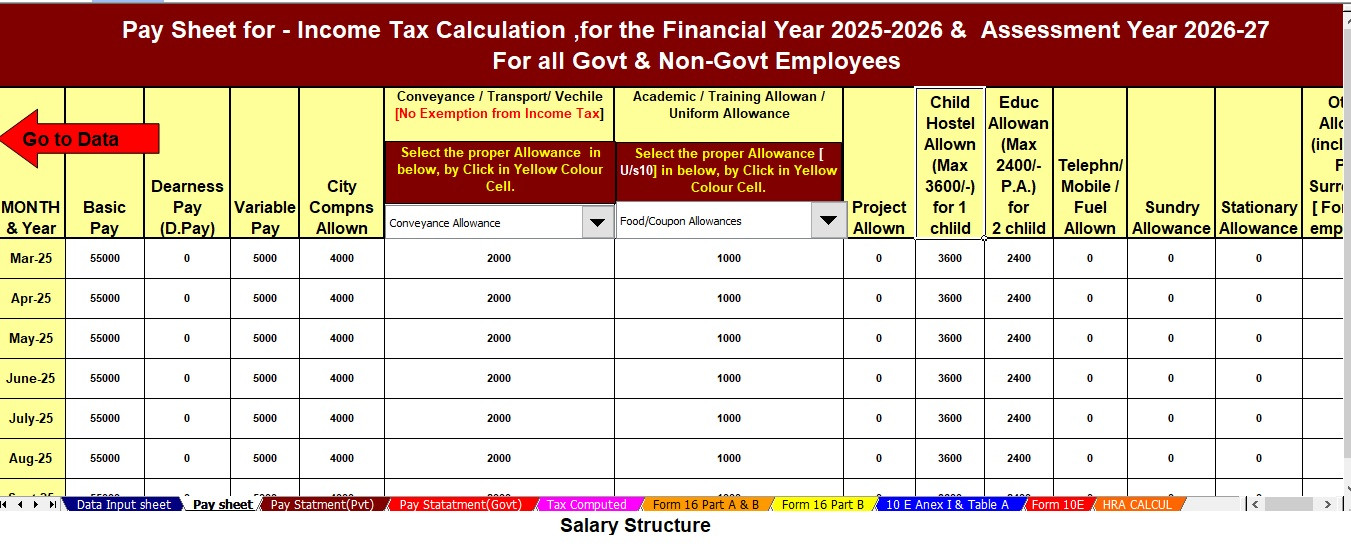
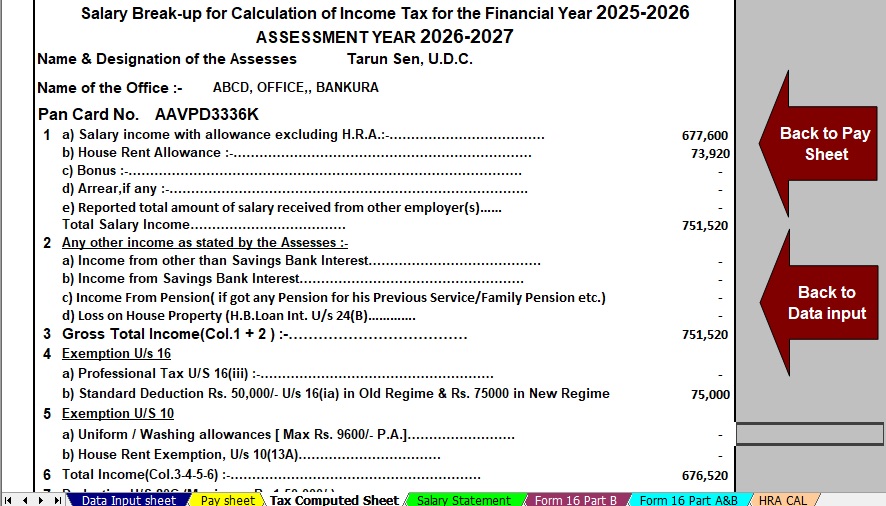


This Excel-based Income Tax Preparation Software All-in-One helps both Government and Non-Government employees calculate tax easily, accurately, and quickly. It simplifies complex tax rules and delivers reliable results with minimal effort.
Key Features of the Excel-Based Tax Preparation Utility
1. Dual Regime Option
You can easily choose between the Old Tax Regime and the New Tax Regime under Section 115BAC. First, the software calculates tax under both regimes. Then, it compares the results automatically. As a result, you can confidently select the option that saves the most tax.
2. Customised Salary Structure
The software adapts automatically to your salary structure, whether you work in a Government or Non-Government organisation. Moreover, it adjusts allowances and deductions accurately. Therefore, you reduce manual data entry and save valuable time.
3. Automatic Arrears Relief Calculator [Section 89(1) + Form 10E]
The tool calculates arrears relief correctly for financial years from 2000–01 to 2025–26. Additionally, it generates Form 10E instantly. Consequently, you claim tax relief without confusion or calculation errors.
4. Updated Form 16 (Part A & Part B)
The software automatically prepares Revised Form 16 (Part A & Part B) for the Financial Year 2025–26. Similarly, it follows the latest income tax format. Hence, your Form 16 remains accurate and compliant.
5. Simplified Compliance
Built-in formulas ensure fast and error-free tax computation. Finally, the software eliminates manual intervention, improves accuracy, and helps you prepare returns with complete confidence.